Why You Need a Temporary Email to Stay Safe Online
Why You Need a Temporary Email to Stay Safe Online
Have you ever thought about how much personal data is collected when you sign up for new services? In today's world, your main email is a target for unwanted marketing and tracking. Protecting your digital identity is now a must for anyone online.

A Throwaway Email is your first defense against online threats. It keeps your main account safe, limiting what companies know about you. This simple step helps you take back control of your online presence.
Choosing a Throwaway Email is the best way to avoid spam and data breaches. You can use new services without risking your privacy or security.
Key Takeaways
- Understand the risks of using your primary inbox for every online registration.
- Learn how to minimize data harvesting by using temporary addresses.
- Discover how to effectively block intrusive marketing and spam.
- Take control of your digital footprint with simple security habits.
- Protect your personal information from unnecessary exposure to third parties.
What is Temporary Email?
Learning about disposable email is key to keeping your online life private. Today, many websites ask for your email address. These tools help keep your real email safe from unwanted messages.
Definition of Temporary Email
A temporary email is a short-term email address. It lets you get messages without sharing your main email. These addresses are made to be used once and then thrown away.
Using a disposable email stops marketers and hackers from tracking you. It keeps your real email inbox clean and safe from spam and threats.
How Temporary Email Works
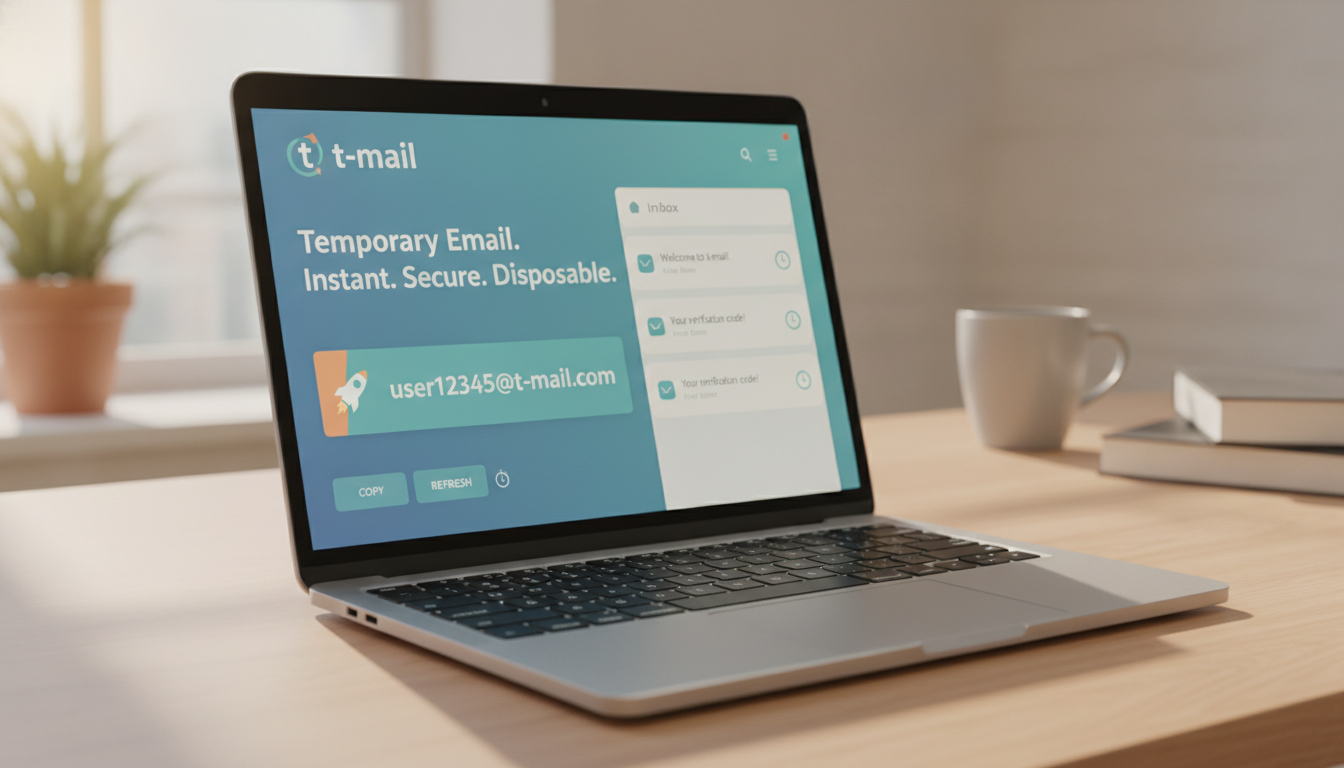
It's easy and quick to use. Services like Maildrop let you create a new email address right away. You don't need to sign up or make a password.
Just enter the temporary email when you need to. The service catches any messages. Then, you can read them online. After you're done, just close the tab, and the email address is gone.
| Feature | Primary Email | Temporary Email |
|---|---|---|
| Registration | Required | Not Required |
| Longevity | Permanent | Short-term |
| Privacy Level | Low | High |
| Primary Use | Personal/Work | One-time tasks |
This simple method makes your temporary email a great tool for a clean online life. It keeps your main email safe from spam and data leaks.
The Risks of Using Your Primary Email
Your primary email is a key part of your online life. But, it's also a weak spot for hackers. Using a Temporary Email Address helps protect your personal info.
Spam and Unwanted Newsletters
Spam bots are always looking for email addresses online. Once they find yours, you'll get lots of unwanted emails. Maildrop offers a safe, temporary email to avoid this.
With a Temporary Email Address, your main inbox stays clean. You can sign up for things without sharing your real email. This keeps your main email for important stuff only.
Data Breaches and Identity Theft
Even safe sites can get hacked. If your email is linked to a hacked site, your info could be stolen. A Temporary Email Address helps keep your real identity safe.
Keeping your personal accounts separate is key to staying safe online. If a site you used gets hacked, your main account stays safe. Here's why it's important:
| Risk Factor | Primary Email | Temporary Email Address |
|---|---|---|
| Spam Exposure | High | None |
| Data Breach Impact | Severe | Negligible |
| Identity Tracking | Persistent | Anonymous |
| Inbox Clutter | Constant | Zero |
Benefits of Using Temporary Email
Many internet users find that a burner email makes their digital life easier. It keeps your temporary sign-ups separate from your main inbox. This way, you have better control over your personal data.
This simple change lets you surf the web with more confidence. You can handle online tasks without worrying about your privacy.
https://www.youtube.com/watch?v=DnflZIAmfLc
Enhanced Privacy and Security
A burner email protects your main account from harm. When you sign up for new services, you risk sharing your real email. But with a burner email, you keep your real identity safe.
This means you're less likely to be targeted by hackers. Your personal info stays secure, even if a website gets hacked.
Security is key in today's online world. A temporary email keeps your sensitive info safe. You can use online services without worrying about identity theft.
Reducing Email Clutter
Dealing with too many newsletters is a big hassle. A burner email helps keep your main inbox tidy. You won't have to delete unwanted emails every day.
Tools like Mail Wave make it even better. They automatically remove old emails. This keeps your temporary inbox clean and focused on important messages.
When to Use Temporary Email
Ever wonder when to use a burner email online? Your main inbox is great for personal stuff. But, sharing it with sites can lead to unwanted marketing. A temporary email keeps your main account safe and clean.
Signing Up for Free Trials
Many software companies ask for an email to try their products for free. Using your personal email can lead to too many sales calls. Mail Wave is a good choice for trying software without sharing your real email.
Downloading E-books and Whitepapers
Getting gated content can be a privacy risk. Downloading e-books or whitepapers often adds you to long lists. A burner email lets you get what you need without clogging your inbox with ads.
Registering for Events or Webinars
Signing up for online events or webinars can risk your data. Sponsors often get attendee lists, leading to more spam. A temporary email keeps your inbox clean while you get the event details.
| Scenario | Personal Email | Burner Email |
|---|---|---|
| Banking & Finance | Recommended | Not Recommended |
| Software Free Trials | Avoid | Highly Recommended |
| Gated Content Downloads | Avoid | Highly Recommended |
| Webinar Registration | Avoid | Highly Recommended |
How to Choose a Temporary Email Provider
Choosing a service for better online security is key. Many platforms offer an anonymous email address. But, the quality and protection vary a lot.
Key Features to Look For
Look for services with intuitive interfaces and strong security. Being able to customize your address is also important. It helps manage subscriptions without getting mixed up.
For those who like automation, it's a big plus. Some services have a GraphQL interface for automated tasks. Always check the retention policy to make sure messages are deleted when you want.
Popular Temporary Email Services
Many reliable services are out there, each for different needs. Maildrop is great for developers with its clean design and features. Services like 10MinuteMail or Guerrilla Mail are quick and easy for an anonymous email.
Here's a table to help you see the main differences:
| Provider | Best For | Key Feature | Privacy Level |
|---|---|---|---|
| Maildrop | Developers | GraphQL API | High |
| 10MinuteMail | Quick Tasks | Auto-expiry | Medium |
| Guerrilla Mail | General Use | Custom Domains | High |
| Temp-Mail | Mobile Users | App Integration | Medium |
The right choice depends on your needs. Do you need a simple inbox for one-time use or a sophisticated tool for ongoing privacy? By comparing, you can pick an anonymous email service that keeps your inbox clean and your identity safe.
Setting Up a Temporary Email Account
Creating a temporary email address is easy and fast. You don't need to share personal info or fill out long forms. Most sites focus on speed, so you can protect your online identity quickly.

Step-by-Step Guide
Platforms like Mail Wave make it simple. Just visit their site, and you get a unique temporary email address right away.
- Navigate to the provider's website in your preferred web browser.
- Observe the inbox interface that appears automatically on your screen.
- Copy the provided address to your clipboard for immediate use.
- Paste this address into the registration form of the service you are testing.
Tips for Easy Management
Keeping your inbox tidy is important. It helps you stay on top of important emails. Managing multiple disposable accounts well is crucial for efficiency.
Save your inbox links in browser bookmarks for easy access. If you get a crucial email, copy its content or save it in your favorites folder before it expires.
"Privacy is not an option, and it should be the standard for every internet user navigating the modern web."
| Method | Setup Time | Privacy Level |
|---|---|---|
| Mail Wave | Instant | High |
| Browser Extensions | Seconds | Medium |
| Manual Aliasing | Minutes | Low |
By following these steps, you can keep your main inbox clean. Use a temporary email address for all sign-ups. Staying organized lets you enjoy the benefits of these tools without stress.
Common Misconceptions About Temporary Email
You might wonder if a fake email is truly a secure tool for your daily digital interactions. Many users feel hesitant because they do not fully understand how these services protect their primary inbox from unwanted clutter and potential threats.
Are They Truly Secure?
These services offer excellent privacy for quick sign-ups. But, they are not designed for long-term data storage. You should never use a temporary address for critical account recovery or sensitive banking needs, as these accounts are often deleted after a short period.
Think of a fake email as a disposable shield rather than a permanent vault. It is highly effective at keeping your real identity hidden from marketers. But, it lacks the robust security protocols required for managing your personal financial assets.
Can They Be Used for Business?
Using a temporary address for professional communication is generally discouraged. It lacks the credibility of a custom domain. But, some niche sectors find them useful for specific, low-risk tasks.
For instance, services like EmailOnDeck are Bitcoin and cryptocurrency friendly. They make them a popular choice for users who want to keep their transaction notifications separate from their main business accounts. Despite this, you must remember that these tools are not meant to replace your professional email infrastructure.
| Use Case | Temporary Email | Permanent Email |
|---|---|---|
| Newsletter Sign-ups | Recommended | Not Recommended |
| Banking/Finance | Never Use | Highly Recommended |
| Crypto Transactions | Optional/Privacy | Standard |
| Account Recovery | Not Suitable | Essential |
Ultimately, the key is to understand the limitations of your tools. By using a fake email only for its intended purpose, you can maintain a high level of digital hygiene without compromising your important accounts.
Legal Considerations
Many users wonder if using an anonymous email service is legal. It's important to know how your personal info is handled online. Privacy is key, but following modern laws is also crucial.
Compliance with Data Protection Laws
Data protection laws, like GDPR or CCPA, focus on how companies handle your info. Many services, like Mailwave, don't log personal data. This keeps your use private.
These services avoid collecting identifiable info to protect your data. This follows global privacy standards. Using an anonymous email means you're with a system that respects your privacy.
Spam Regulations and Temporary Emails
Concerns about spam laws are common. Spam laws, like the CAN-SPAM Act, aim to stop unwanted emails. Using a temporary email doesn't break these laws, as it keeps your inbox clean.
These tools shield your real email from marketers. By hiding your main email, you get less spam. Here's how different privacy features stack up legally and functionally.
| Feature | Privacy Impact | Legal Compliance |
|---|---|---|
| No Data Logging | High | Strong |
| Encrypted Transit | Medium | Standard |
| Short-term Storage | High | Excellent |
| Identity Masking | High | Compliant |
Using an anonymous email is a legal way to manage your online presence. It's safe as long as you use it for legal activities. Always check the terms of your service to follow local laws.
Temporary Email vs. Disposable Email
Choosing the right tool for your privacy needs is important. You need to know the difference between a basic throwaway email and a professional disposable email provider. While many users think they are the same, they offer different levels of service and reliability.

Key Differences Explained
A standard throwaway email is for a single, immediate interaction. These services provide an inbox that expires quickly, making them great for bypassing a quick registration wall.
A disposable email service, on the other hand, offers more features. For example, Mail Wave provides premium plans with extended retention periods. This lets you keep your address active for days or weeks if needed.
Use Cases for Each
Choosing between services depends on your online task. For quick account verification or one-time file downloads, a basic throwaway email is best.
But for services that send follow-up codes or require longer interaction, a disposable email with extended storage is better. Here's a quick guide to help you decide:
- Short-term tasks: Use a basic address for quick sign-ups or one-time downloads.
- Extended projects: Use a premium service when you need to monitor an inbox for several days.
- Privacy-focused browsing: Use a service with advanced security features to keep your primary identity hidden.
| Feature | Throwaway Email | Disposable Email |
|---|---|---|
| Lifespan | Very Short | Flexible/Extended |
| Best For | One-time access | Ongoing verification |
| Premium Options | Rare | Common |
By choosing the right tool, you keep your inbox clean. You also get the security you need for your online activities.
Troubleshooting Temporary Email Issues
Even the most reliable digital tools can sometimes face unexpected problems. Using a fake email address helps keep your privacy safe. But, you might run into small issues during use. Luckily, most of these problems are easy to fix with a few quick steps.
Common Problems and Solutions
One common issue is when certain services don't work as expected. For example, Mailwave is a receive-only service. This means you can't send emails from it.
If a website blocks your fake email domain, try refreshing the page. Or, pick a different domain from the service. Often, changing the domain suffix can get past filters.
Also, check your internet connection if messages are slow to arrive. Sometimes, a browser refresh or clearing cache fixes issues. Keeping your browser updated also helps your fake email work better.
When to Contact Customer Support
When you can't fix a problem yourself, it's time to ask for help. If you've tried different domains and checked your connection, but still can't get verification codes, contact support. Customer support is best for big service outages or bugs that block your access.
When you submit a ticket, give all the details. Mention the domain you used and the website for registration. This helps the support team solve your problem faster.
The Future of Temporary Emails
The way we manage our online identity is changing fast. The digital world is getting more complex, and our personal data is more valuable than ever. Using a temporary email is becoming a common practice for smart internet users.
Trends in Online Privacy
Privacy standards are changing fast around the world. Services are now making it easier for people everywhere to keep their identity safe. For example, Mailwave is available in many languages to help a wide range of users.
This move towards global access means you can keep your privacy no matter where you are. As these tools get better, they work smoothly with browser extensions and mobile apps. This makes using a temporary email easy and efficient for everyday tasks.
The Growing Need for Temporary Solutions
More websites now ask for email verification for simple tasks. This means you have to share your main email address more often than you'd like. So, the need for a reliable temporary email service is growing fast.
Future services will likely have better features like encrypted storage and automatic cleanup. These improvements will give you more control over your online presence. The table below shows how these services will evolve to meet your security needs.
| Feature | Current Standard | Future Evolution |
|---|---|---|
| Language Support | Limited | Multilingual Global Access |
| Security Level | Basic Masking | Advanced Encryption |
| User Control | Manual Deletion | Automated Privacy Rules |
| Integration | Web-based Only | Cross-Platform Syncing |
Conclusion: Making the Switch
Protecting your personal identity is key in today's world of constant data tracking. Switching to a temporary email service is a simple yet effective way to secure your online activities.
Why You Should Start Using Temporary Email Today
Using an Anonymous Email Address for non-essential sign-ups gives you control over your inbox. These services delete your data after you're done, stopping marketers from tracking you. This keeps your main inbox free from spam, making it better for important emails.
Final Tips for Safe Online Practices
Be careful with your main email address online. Use a temporary email for sites that ask for registration for a one-time download or free trial. This way, you avoid data breaches and keep your personal info safe. Enjoy a safer, more private internet every time you're online.
FAQ
What exactly is a Throwaway Email?
A Throwaway Email is a short-term address for a specific message or code. It's then deleted to keep your real inbox spam-free.
Is it safe to use a Disposable Email for a trial on a site like Netflix or Hulu?
Yes, it's safe for trials. But, you might need that email later for account recovery.
Why is it called a Burner Email?
It's like a "burner phone." Use it temporarily, then discard it after its purpose is served.
Can I send messages using a Fake Email service like Mail Wave?
No, services like Mail Wave are only for receiving emails. This keeps them safe from spam.
What is the difference between a Temporary Email and an Anonymous Email?
Temporary Emails focus on short-term use. Anonymous Emails hide your identity. Maildrop offers both.
Will a Temporary Email Address help me avoid identity theft?
Yes, it protects your main email from breaches. Use it on sites you don't trust.
Can I use an Anonymous Email Address for cryptocurrency exchanges like Coinbase?
No, use a secure email for financial sites. You might need it for security alerts.
Does Maildrop offer features for software developers?
Yes, Maildrop has a GraphQL API for developers. It automates email testing.
How long do messages stay in a Mail Wave inbox?
Mail Wave holds messages for a few days. It then deletes them to protect your privacy.
Are these services legal to use under the GDPR?
Yes, they're legal under GDPR. Providers like Mail Wave follow strict privacy rules.